
Welltory Crash Tracker: a free crash log for ME/CFS, long COVID and POTS, and what it shows next to your crashes
Log each crash for free — start and end, severity, symptoms, what came before and what helped — and, with a subscription, see every crash day against your own activity, stress and HRV baseline. What it records, what it costs, and what no pacing app can do yet.

Short answer
Welltory's Crash Tracker on iPhone records each crash — when it started and ended, how severe it was, your symptoms, what came before, what you did afterwards and whether it helped — and shows it next to your own activity, stress and heart rate variability (HRV). Logging is free. With a subscription, every crash day is compared with your own history for three measures — Total Active Time, Stress Time and Today's HRV — so you can see what tended to look different around your crashes.
If you live with post-exertional malaise (PEM), you already know the hardest part: the crash often arrives a day or two after the thing that caused it, and by then you cannot remember what you did. A crash log written at the time, with your body's data beside it, is how you start to see your own envelope instead of guessing.
It is available in English on iPhone; the best experience is with an Apple Watch or Oura ring, and Spanish and other languages are coming soon. It switches on when you tell the app you have ME/CFS or chronic fatigue, long COVID or POTS. It records what you report; it does not detect, predict or diagnose a crash, and "what came before" is context, not proof of a cause.
Note: this article describes a consumer wellness app and is not medical advice. Features and availability are as of November 2026. New or rapidly worsening symptoms, chest pain or fainting need medical care.


Discounts for blog readers: up to 36% off
See what affects your energy, stress, sleep, and daily state with Welltory
Welltory Crash Tracker at a glance
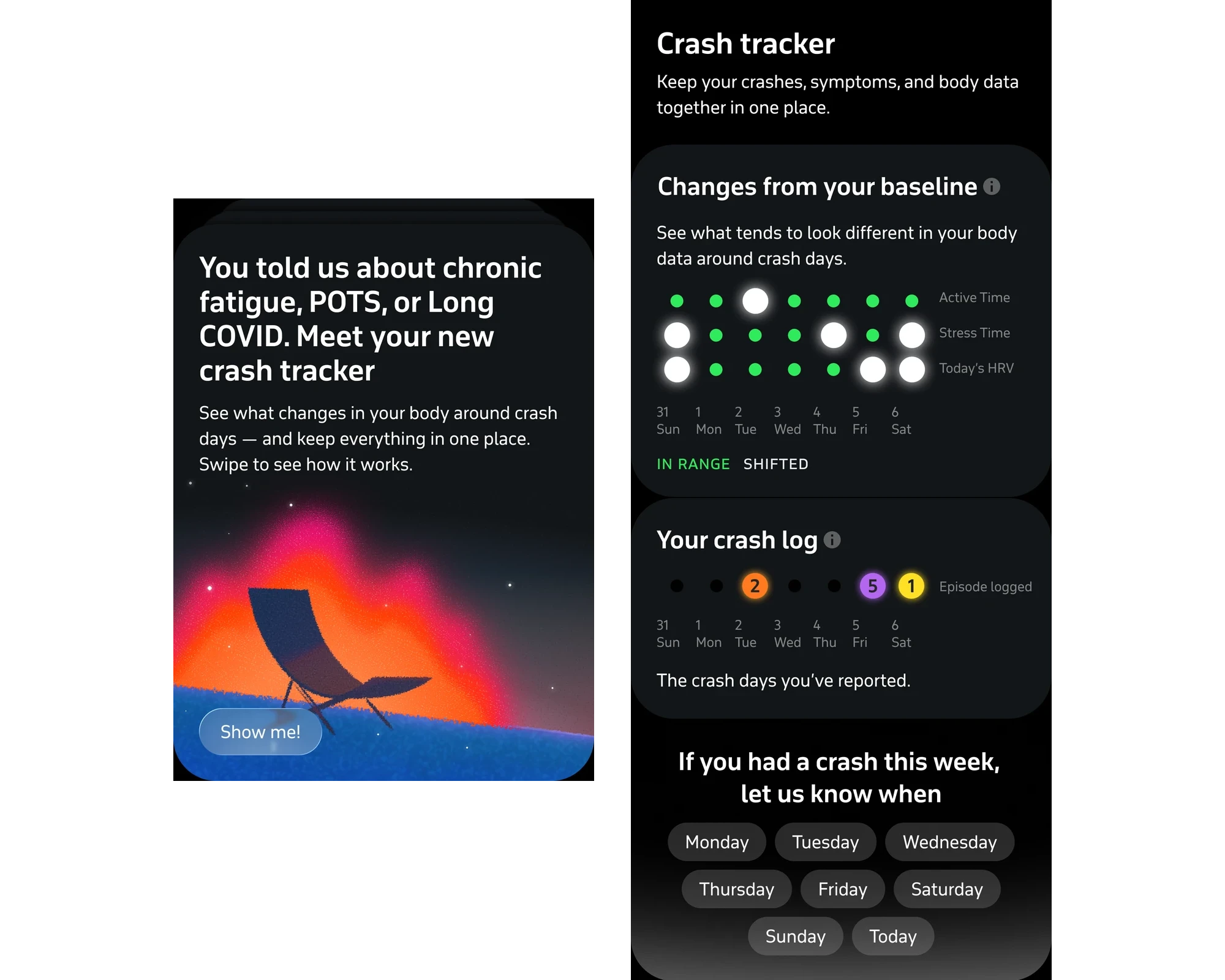
What you log — The day it began, start and end time or "still ongoing", severity, symptoms, what came before, what you did afterwards, whether it helped, and a note
How far back — Any of the last 7 days from the Today screen
More than one crash a day — Yes — log them separately, or as one day with the Multi-dip symptom
What it shows — A 7-day crash log, plus each day compared with your own history for Total Active Time, Stress Time and Today's HRV
Free — Logging, symptoms and context, notes, reading and editing entries
Subscription — Objective measurements, "Changes from your baseline" and the detailed charts
Platform — iPhone, in English (Spanish and other languages coming soon); best with an Apple Watch or Oura ring
Predicts crashes? — No. The charts cannot predict a crash or identify its cause
Feature details as of November 2026. Step-by-step guide: Crash Tracker in the Welltory Help Center.
Quick answers about the Welltory Crash Tracker
Is the Welltory Crash Tracker free? Yes, logging is free. The baseline charts need a subscription.
Is it a pacing app? It is a crash log with your body's data beside it. It does not set an energy budget or sound an alarm; it helps you see, over weeks, what your crashes tend to follow.
Who is it for? People who told the app they have ME/CFS or chronic fatigue, long COVID or POTS. Anyone on iPhone can switch it on in the menu.
Does it work on iPhone? Yes, on iOS, in English. Spanish and other languages are coming soon.
Does it work on Android? Not yet. The Crash Tracker is on iOS for now.
Do I need an Apple Watch? For the fullest and most accurate experience, yes — an Apple Watch or an Oura ring.
Can I log a crash from a few days ago? Yes, any of the last 7 days.
What if a crash lasts several days? Log one entry per day; a note such as "continued from yesterday" keeps them connected.
Does it predict crashes? No. No consumer app or wearable has been shown to warn an individual that a crash is coming.
Does it diagnose ME/CFS or PEM? No. It records what you report. Diagnosis is a doctor's job.
Can I use it with the Migraine Tracker? Only one tracker can be on at a time. If you reported both, the Crash Tracker is shown by default and you can switch in the menu.
What can you log in the Crash Tracker?
You start from Crash Tracker on the Today screen and choose the day the crash began. Then you add the start and end time, or switch on Still ongoing if it has not ended yet. A slider records how bad it was, from "not a crash" to "can't manage basics". After that come your symptoms, what came before, what you did afterwards and whether it helped. Anything missing from the lists goes into Leave a note, so it stays attached to that crash.
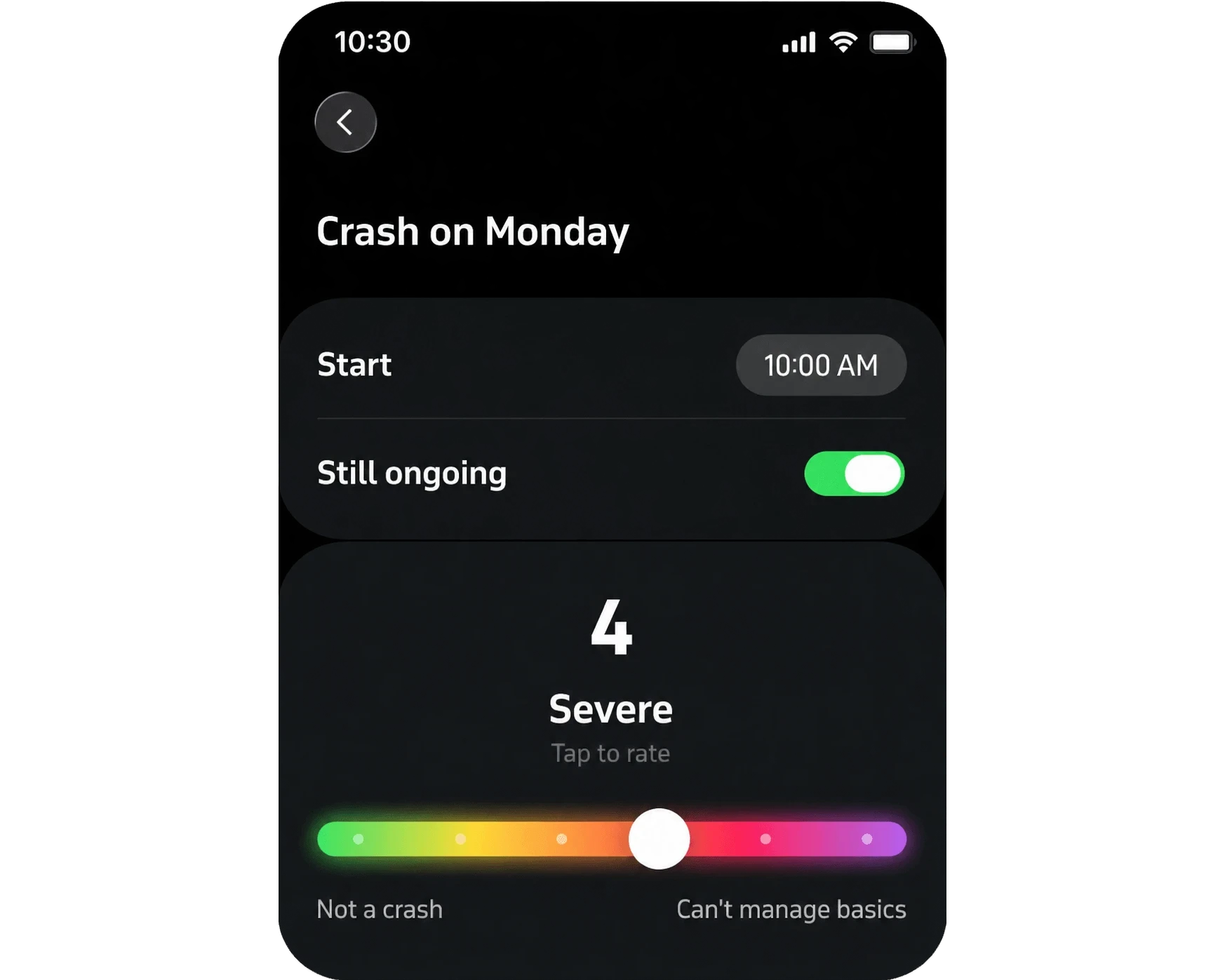
Each entry is saved to your Journal. You can open it again later from the Journal or from your crash log and edit it.
"What came before" is a place for context, not a verdict. Choosing "long walk" or "work call" does not mean that activity caused the crash. Crashes from PEM can start hours or days after the effort that set them off, so the honest use of this field is to collect the evidence and look at it later.
The crash form has no separate medication list. If you want to record a medicine, or a symptom that is not in More symptoms, write it in the note. You can ask for a new tag from the episode details with Give feedback; a note does not add a tag to the catalogue by itself.
Crashes that last days, and days with several dips
PEM rarely fits a neat box. There are three rules for the awkward cases:
One entry covers one day. The end time cannot go past midnight of the day the crash began. If it carries on, set the end to when you went to sleep (or leave it empty), then log the next day as a new entry. A note such as "continued from yesterday" keeps them connected.
A day of small dips can be one entry with Multi-dip chosen from Symptoms. If the dips were clearly separate, log them as separate entries; the crash log then shows the highest severity of the day.
"Still ongoing" works only for a crash that started today. When it ends, open the entry and add the end time. You can go back 7 days; a past day logged without an end time ends at the end of that day.
Your crash log: the last seven days at a glance
Your crash log shows the last seven days, including today. A marked day is a day you recorded a crash — not a day Welltory detected one on its own. The number on the day is the severity you gave it. If you logged several crashes that day, the log shows the highest one, and you can open the day to see each entry.
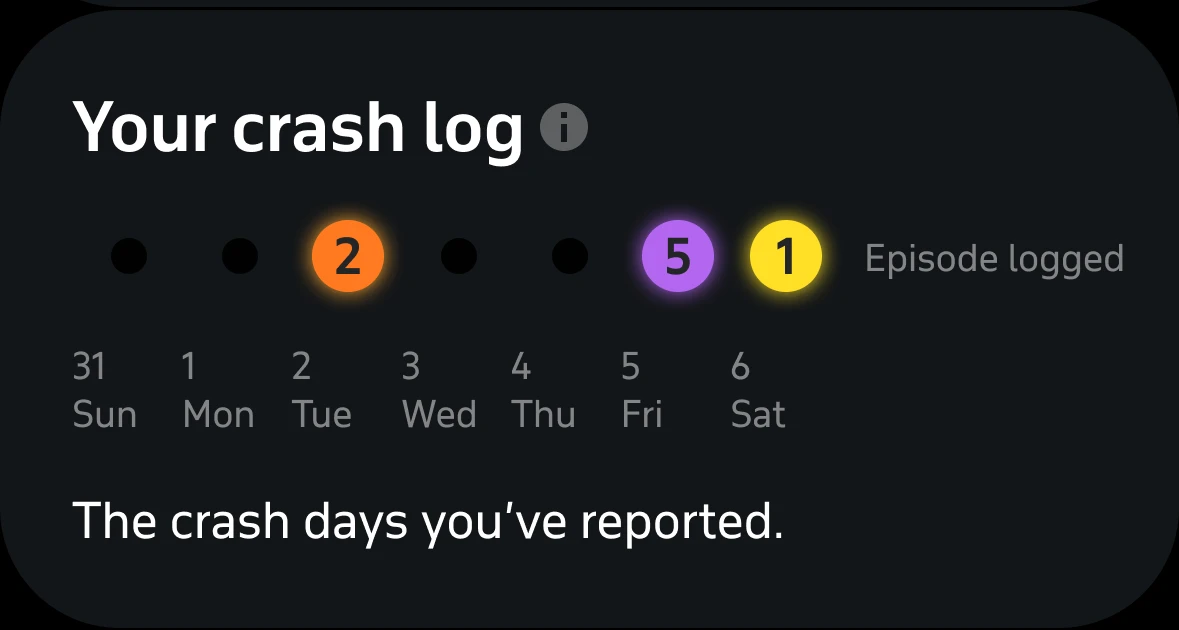
That count matters more than it looks. The pattern people with ME/CFS describe — pushing to do more, then crashing — is exactly what the US Centers for Disease Control and Prevention lists as the cycle PEM creates, and recovery can take days, weeks or longer (CDC). A week view filled in at the time shows how often that cycle is turning, which is hard to reconstruct from memory at an appointment.
Changes from your baseline: what activity, stress and HRV looked like around crash days
This is the part a paper diary cannot do. The tracker compares each day with your own history, not with a population average — and a baseline here is a boundary, not a target. A low activity boundary can be exactly right for someone whose envelope is small.
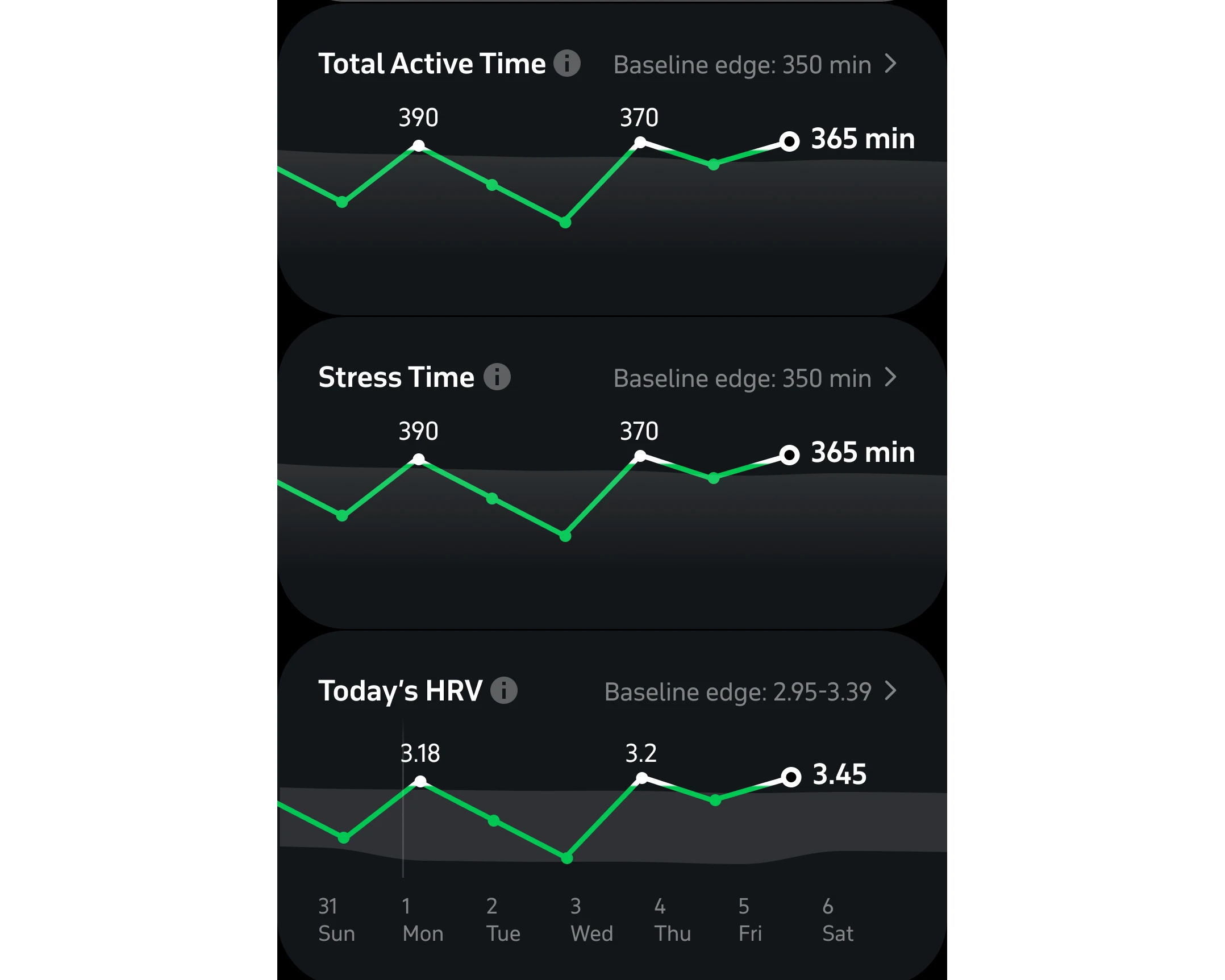
For Total Active Time and Stress Time, Welltory looks at the 30 calendar days before each day; the day being assessed never moves its own baseline. A day counts only if its sleep period is known and no more than two hours of data are missing while you were awake. With fewer than 14 reliable days, no baseline line is drawn yet. Days with gaps do not drag your baseline down just because minutes were missing.
Three measures are shown:
Total Active Time — all active minutes, light movement included. Activity above your personal upper boundary is marked as shifted; less activity is not.
Stress Time — minutes of stress. Time above your upper boundary is marked as shifted.
Today's HRV — the HRV measure used in Health (lnRMSSD), compared with a separate personal reference range.
In Changes from your baseline, a small green dot means the value was within its range, a larger white dot means it was shifted, and a blank means there was no value or no reliable comparison. A blank does not mean the day was fine. The detailed charts underneath show the daily values against your boundaries.
Over a few weeks this can show you a pattern worth testing: for example, that your crashes tend to come a day or two after days when active time went above your usual range, or after a stretch of high stress time. Look across several days rather than reading one shifted value as a warning or an explanation. See the PEM signal in 700,000 days of data and crash warning signs for how people read these patterns.


Work out your pacing with women who get it
Welltory Energy Lab is a paid, moderated online community for women 18 to 65 living with ME/CFS, long COVID, POTS, fibromyalgia and similar. Peer support and education, not medical care.
What is free, and what needs a subscription?
Free: logging crashes, recording symptoms and context, adding notes, and reading or editing your entries. You can keep a full crash diary without paying.
Subscription: the objective measurements, Changes from your baseline and the detailed charts. Subscribing does not create values for days without data, and it does not draw a baseline before there are enough reliable days.
Welltory Care: members of a Care program, such as Energy Lab, also see pacing charts below the main measures — Energy Envelope, Sustained Effort, Spend vs Sleep, Cost of Light Effort, Stress Swing, Stress Range and Relative REM. They follow the same idea: your own history, not a population average, and context rather than predictions. See what an energy envelope is.
Who sees the tracker, and how do you turn it on?
The Crash Tracker is available in English on iOS; the best experience is with an Apple Watch or Oura ring, and Spanish and other languages are coming soon. It is turned on for you if you told Welltory about ME/CFS or chronic fatigue, long COVID or POTS — during onboarding, when you came back to the app, or in a question on Today. If you reported both a PEM-related condition and migraine, the Crash Tracker is shown by default.
Only one tracker can be on at a time. To turn it on or off: menu → Customization → Today screen → Crash Tracker. You can switch it on this way yourself, even if you did not mention a condition at onboarding.
Your answers help tailor the app. Welltory does not use them to diagnose a condition.
Do you need an Apple Watch?
For the fullest and most accurate experience, yes: the Crash Tracker works best with an Apple Watch or Oura ring connected to Welltory. With an iPhone alone you can still take phone-camera readings of heart rate and HRV and add notes and tags to them, but the Today screen, the tracker and the baseline charts come with a connected Apple Watch or Oura ring.
The baseline comparison needs days with a known sleep period and no more than two hours of missing data while you are awake, which in practice means measurements collected through the day and night by a device connected to Welltory. If wearing a device is itself too much on bad days, a morning camera reading is a lighter option; see pacing without a wearable and how accurate HRV from a phone camera is.
What the Crash Tracker cannot do
These limits are not special to Welltory; they apply to every pacing app and wearable on sale today.
It does not predict crashes. No consumer app or wearable has been shown to tell an individual that a crash is coming. It shows you your own history so you can plan, not a forecast.
It does not set your limits for you. It does not calculate a safe heart rate or a daily step budget. Whether a pattern means "do less of this" is a judgement for you, ideally with your care team.
It does not find the cause. "What came before" and a shifted day are context. PEM can be delayed, and a crash can follow cognitive, emotional or upright effort as well as physical activity.
It does not diagnose. A marked day is a day you logged. ME/CFS, long COVID and POTS are diagnosed by clinicians.
It does not replace a clinician report. There is no dedicated report for your doctor yet. You can show your log and Journal, and export measurements as a CSV from the web app.
How does it fit with other ways to pace?
Heart-rate alarms such as the Visible armband or a chest strap with an alert warn you in the moment when your heart rate crosses a limit. Morning checks — a short HRV or resting-heart-rate reading — tell you something about today before you spend energy. Diaries on paper or in apps such as Bearable record symptoms and activities. The Crash Tracker sits between the last two: a crash diary with your own activity, stress and HRV data beside it.
A paper diary costs nothing, but people tend to fill it in later. In a study in the BMJ, light sensors in the binders showed participants opened their paper diaries at the right time on only 11% of occasions, while the cards they handed in suggested more than 90% (Stone 2002). On a crash day, a tap on the phone is also simply less work.
Whatever tool you use, the goal is the one the UK's NICE guideline sets for ME/CFS: an energy management plan that keeps activity within your current limits (NICE NG206). A log of when you crashed is one of the most direct ways to learn where those limits are.
For the whole category side by side, see best pacing apps compared, and for the logic behind pacing, pacing for chronic illness.
Living with crash tracking: the questions people ask next
How long before the charts tell me anything?
The baseline needs at least 14 reliable days before a line is drawn, and a pattern needs several crashes. Expect a few weeks of logging before you see anything worth acting on.
What should I log on a good day?
Nothing in the tracker — the measurements carry on in the background. Good days matter as much as crash days, because they are what your baseline is built from.
Should I log a "near miss"?
If you felt a crash coming and rested, a note on the day can be useful later. The tracker records crashes, so log it only if symptoms actually flared.
Logging is too much on a bad day. What then?
Log the minimum — the day and the severity — and fill in the rest when you can. You can go back 7 days and edit any entry later.
Does the tracker count mental effort?
Total Active Time counts movement, and Stress Time counts minutes of stress, which often rise with demanding cognitive or emotional days. Note a hard conversation or a day of screens in "what came before" or in the note, so it is there when you look back.
Start understanding your body
Learn what affects your energy, stress, sleep, and daily state. Get the app.
How Welltory helps — and what it cannot do
Log each crash in Crash Tracker. On iPhone, Welltory's Crash Tracker keeps the crash record itself: the day it began, start and end time (or "still ongoing"), how severe it was, your symptoms, what came before, what you did afterwards and whether it helped, plus a note. Logging is free. With a subscription, each crash day is shown against your own baseline for Total Active Time, Stress Time and HRV once there are at least 14 reliable days. It is available in English on iPhone. The best experience is with an Apple Watch or Oura ring; Spanish and other languages are coming soon. "What came before" is context, not proof of a cause, and the charts cannot predict a crash.
Tag the context. On iPhone with an Apple Watch or Oura ring, the Today screen flags stress stretches and asks "What happened?". After a few weeks, My Patterns shows which tagged situations tend to come before stressful stretches.
What it is, and what it is not. Welltory is a general wellness product, not a medical device. It does not diagnose, predict, monitor, prevent, treat or mitigate ME/CFS, long COVID, POTS or any other condition. Patterns are associations to discuss with your care team, not proof of a trigger and not a warning system.
Working this out with other women. If you live with an energy-limiting condition, Welltory runs a paid, moderated community called Energy Lab for women aged 18 to 65 living with ME/CFS, long COVID, fibromyalgia, POTS, MCAS and similar. Members get a personal pacing strategy built on their own data, a community of women with similar symptoms, and a medical board that explains what is happening in the body. It is education and peer support, not medical care, and it does not replace your clinician. Membership renews automatically; you can cancel online at any time, and your first purchase has a 14-day money-back guarantee. What the community is, who it is for and what it costs.
How we made it
Made with AI tools, then edited and fact-checked by the Welltory team. See our Editorial & AI policy.
Jane Smorodnikova, co-founder of Welltory, built the methodology behind how we read physiological data.
Written by Tatsiana Yashyna.
Discounts for blog readers: up to 36% off
See what affects your energy, stress, sleep, and daily state with Welltory
This article describes a consumer wellness product and is not medical advice. Welltory is a general wellness product, not a medical device: it does not diagnose, predict, monitor, prevent, treat or mitigate ME/CFS, long COVID, POTS or any other condition. The Crash Tracker records what you report and compares days with your own history; it does not detect or predict crashes or identify their cause. Features and availability are as of 24 November 2026 and may change. New or rapidly worsening symptoms, chest pain or fainting need medical care — call 911 in an emergency.
Was this helpful?
Ask AI for a summary of page


Written by Jane Smorodnikova

The founder and CEO of Welltory. A recognized tech leader with two Master's degrees and experience at MIT, she has scaled Welltory to over 17 million users.
Written by Tatsiana Yashyna

Deputy COO at Welltory. With a background in medicine and years of working with health data, she translates research and real physiological signals — sleep, stress, heart rate, and hormones — into clear, evidence-based explanations that help people understand what their bodies are telling them.
References
- Welltory Help Center. Crash Tracker (iOS). Updated 10 November 2026. https://help.welltory.com/en/articles/17603343-crash-tracker-ios
- Welltory Help Center. Welltory Care: support programs for ME/CFS, long COVID, POTS, and migraine. Updated 18 November 2026. https://help.welltory.com/en/articles/17744231-welltory-care-support-programs-for-me-cfs-long-covid-pots-and-migraine
- Centers for Disease Control and Prevention. Symptoms of ME/CFS. https://www.cdc.gov/me-cfs/symptoms-diagnosis/symptoms.html
- Stone AA, Shiffman S, Schwartz JE, Broderick JE, Hufford MR. Patient non-compliance with paper diaries. BMJ 2002;324(7347):1193–1194. https://doi.org/10.1136/bmj.324.7347.1193
- National Institute for Health and Care Excellence. Myalgic encephalomyelitis (or encephalopathy)/chronic fatigue syndrome: diagnosis and management (NG206). 2021. https://www.nice.org.uk/guidance/ng206


